|
JobTabs Job Search & Resume Builder 2013 | Submit feedback on this topic |
Glossary Item Box
|
JobTabs Job Search & Resume Builder 2013 | Submit feedback on this topic |
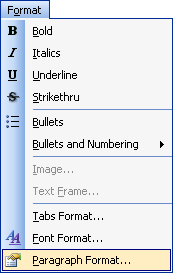
Apply bold formatting to selected text.
Apply italics formatting to selected text.
Apply underline formatting to selected text.
Apply strikethru formatting to selected text.
Format bullets or apply numbering to the document using the options herein.
Formatting Images and Text Frames are elaborated on in detail in the sub topic, "Formatting Images and Text Frames". Please click the link below to proceed to the details.
Formatting Images and Text Frames are elaborated on in detail in the sub topic, "Formatting Images and Text Frames". Please click the link below to proceed to the details.
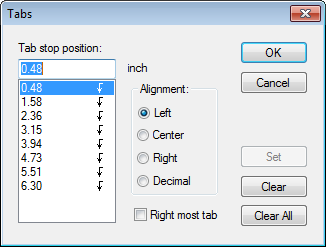
Format the type and location of tabs using the tab dialog shown below. The tab types to the right are located on the left side of the ruler. The tab type can be changed by clicking on the image repeatedly to scroll through the tab types. Upon identifying the desired tab, click anywhere in the ruler to place that tab type at that location.
|
|
|
Manage every aspect of your font with the font dialog.
Manage every aspect of your paragraph with the paragraph dialog.
| See Also |
Formatting Image and Text Frames
© 2005 - 2012 by JobTabs, LLC. All rights reserved.