 |
JobTabs Job Search & Resume Builder 2013 | Submit feedback on this topic |
Glossary Item Box
|
JobTabs Job Search & Resume Builder 2013 | Submit feedback on this topic |
JobTabs Job Search & Resume Builder provides facilities to add, edit and delete Networking Categories.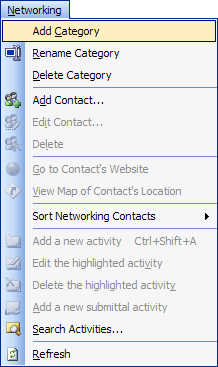
To add a new networking category click Add Category from the menu. Alternatively, right-click the tree view and use the context menu. Upon clicking the menu item, a new top level node will be added to the tree view "New Category." Edit the new category in place and click hit the Enter key to finish editing.
Editing a networking category is akin to renaming the category. Select Rename Category from the main menu or the context menu.
Categories can only be deleted when they contain no contacts. Otherwise, you will receive a dialog asking you to move your contacts to another category before deleting the category. Delete the category using either the main menu or by right-clicking the tree view and using the context menu.
| See Also |
Contacts: Working Your Network
© 2005 - 2012 by JobTabs, LLC. All rights reserved.